Page 55 - Assembly_Solutions
P. 55

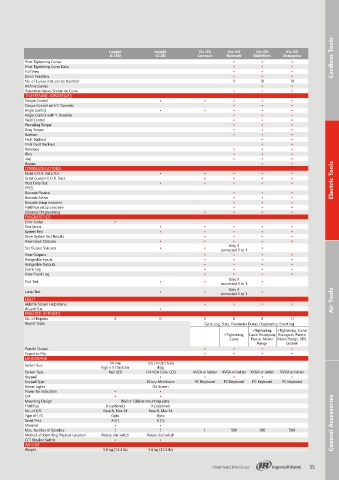
Insight         Insight         Via ICS   Via ICS   Via ICS   Via ICS
                                        IC12M           IC12D          Connect   Network  MultiSync  Enterprise       Cordless Tools Cordless Tools
          Print Tightening Curves                                                  •         •         •
          Print Tightening Curve Data                                              •         •         •
          Full View                                                                •         •         •
          Zoom Function                                                            •         •         •
          No. of Curves that can be Overlaid                                       1        10         10
          Archive Curves                                                                     •         •
          Parameter Values Shown on Curve                                          •         •         •
          TIGHTENING STRATEGIES
          Torque Control                                 •               •         •         •         •
          Torque Control with Y. Override                                          •         •         •
          Angle Control                                  •               •         •         •         •
          Angle Control with Y. Override                                           •         •         •
          Yield Control                                                            •         •         •
          Prevailing Torque                                                        •         •         •
          Drag Torque                                                              •         •         •
          Backout                                                                  •         •         •
          Fault Backout                                                                      •         •
          Final Fault Backout                                                                •         •
          Retorque                                                                 •         •         •
          Wait                                                                     •         •         •
          Jog                                                                      •         •         •
          Bypass                                                                             •         •
          COMMUNICATIONS
          Serial E.O.R. Data Out                         •               •         •         •         •
          Serial Custom E.O.R. Data                                      •         •         •         •              Electric Tools
          Host Data Out                                  •               •         •         •         •
          PFCS
          Barcode Passive                                                          •         •         •
          Barcode Active                                                           •         •         •
          Barcode setup onscreen                                                   •         •         •
          Field Bus setup onscreen                                                 •         •         •
          Ethernet Programming                                           •         •         •         •
          DIAGNOSTICS
          Error Codes                    •
          Text Errors                                    •               •         •         •         •
          System Test                                    •               •         •         •         •
          Store System Test Results                                      •         •         •         •
          View Input Statuses                            •               •         •         •         •
                                                                                 Only if
          Set Output Statuses                            •               •                   •
                                                                               connected 1 to 1
          View Outputs                                                   •         •         •         •
          Assignable Inputs                                              •         •         •         •
          Assignable Outputs                                             •         •         •         •
          Event Log                                                      •         •         •         •
          View Event Log                                                 •         •         •         •
                                                                                 Only if
          Tool Test                                      •               •                   •
                                                                               connected 1 to 1
                                                                                 Only if
          Lamp Test                                      •               •     connected 1 to 1  •
          HELP                                                                                                        Air Tools  Air Tools
          HelpOn Screen Help Menu                                        •         •         •         •
          Wizard Text                                    •
          PRINTED REPORTS
          No. of Reports                 0               0               5         6         9         11
          Report Types                                                   Cycle Log, Stats, Parameter Dump, Diagnostics, Event log
                                                                                          +Tightening,   +Tightening, Curve
                                                                                +Tightening,  Curve Histogram,  Histogram, Pareto,
                                                                                  Curve  Pareto, Mean/ Mean/Range, VIN,
                                                                                           Range      Custom
          Parallel Output                                                •         •         •         •
          Export to File                                                 •         •         •         •
          HARDWARE
                                        14 mm
          Screen Size                high x 5 character   9.6 cm (9/16 in)
                                                        diag
          Screen Type                  Red LED      1/4 VGA Color LCD  XVGA or better  XVGA or better  XVGA or better  XVGA or better
          Keypad                                         •               •         •         •         •
          Keypad Type                               25 key Membrane  PC Keyboard  PC Keyboard  PC Keyboard  PC Keyboard
          Status Lights                                On Screen
          Power On Indication            •               •
          GFI                            •               •
          Mounting Design                   Wall or Cabinet mounting plate
          Field Bus                   X (optional)    X (optional)
          No. of I/O                 Base 8, Max 24  Base 8, Max 24
          Type of I/O                   Opto            Opto
          Serial Port                   X (1)           X (1)
          Ethernet                       •               •                                                            General Accessories General Accessories
          Max. Number of Spindles        1               1               1        500       100        500
          Method of Identifing Physical Location  Rotary dial switch  Rotary dial switch
          CCT Breaker Switch             •               •
          WEIGHT
          Weight                     5.6 kg (12.4 lb)  5.6 kg (12.4 lb)


                                                                            download.irtools.eu               55
   50   51   52   53   54   55   56   57   58   59   60