Page 14 - QX Series
P. 14

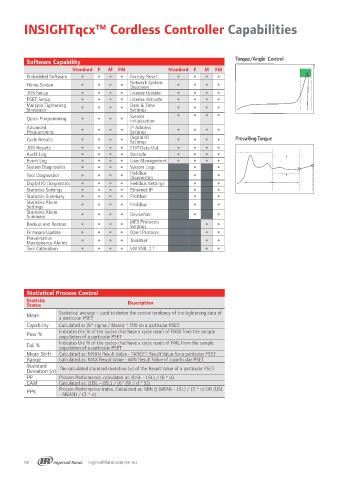
INSIGHTqcx™ Cordless Controller Capabilities


                                                                                    Torque/Angle  Control
          Software Capability
                          Standard F   M   FM               Standard F   M   FM
          Embedded Software                Factory Reset              
          Home Screen                      Network System             
                                               Discovery
          JOB Setup                        License Update             
          PSET Setup                       License Activate           
          Multiple Tightening                  Date & Time
          Strategies                       Settings                   
          Quick Programming                System                     
                                               Initialization
          Advanced                             IP Address
          Programming                      Settings                   
          Cycle Results                    Digital IO                       Prevailing Torque
                                               Settings
          JOB Results                      EOR Data Out               
          Audit Log                        Barcode                    
          Event Log                        User Management            
          System Diagnostics               System Logs                  
          Tool Diagnostics                 Fieldbus                     
                                               Diagnostics
          Digital IO Diagnostics           Fieldbus Settings            
          Statistics Settings              Ethernet IP                  
          Statistics Summary               ProfiNet                     
          Statistics Alarm                     ProfiBus
          Settings                                                      
          Statistics Alarm                 DeviceNet                    
          Summary
          Backup and Restore               MES Protocols                
                                               Settings
          Firmware Update                  Open Protocol                
          Preventative                         ToolsNet
          Maintenance Alarms                                            
          Tool Calibration                 VW XML 2.1                   


          Statistical Process Control
          Statistic                           Description
          Status
          Mean        Statistical average - used to derive the central tendency of the tightening data of
                      a particular PSET
          Capability  Calculated as (6* sigma / Mean) * 100 on a particular PSET
          Pass %      Indicates the % of the cycles that have a cycle result of PASS from the sample
                      population of a particular PSET
          Fail %      Indicates the % of the cycles that have a cycle result of FAIL from the sample
                      population of a particular PSET
          Mean Shift  Calculated as: MEAN Result Value - TARGET Result Value for a particular PSET
          Range       Calculated as: MAX Result Value - MIN Result Value of a particular PSET.
          Standard
          Deviation (σ)  The calculated standard deviation (σ) of the Result Value of a particular PSET.
          PP          Process Performance, calculated as: (USL - LSL) / (6 * σ)
          CAM         Calculated as: (USL - USL) / (6* (W / d * S))
          PPK         Process Performance Index, Calculated as: MIN (( MEAN - LSL) / (3 * σ) OR (USL
                      - MEAN) / (3 * σ)


         14                     IngersollRand.com/en-eu
   9   10   11   12   13   14   15   16   17   18   19